This post contains affiliate links. If you make a purchase through these links, I may earn a commission at no extra cost to you.
WordPress.com vs. WordPress.org: What I Actually Found When I Built a Site on Both
I’ve run a self-hosted WordPress.org site for years — that’s digitalaudience.site, the one you’re probably reading this on. So when I signed up for a WordPress.com test account this month to see how the hosted version compares, I wasn’t coming at it cold. I knew exactly what I was used to, which made it easy to spot what’s different.
This isn’t a feature-page comparison. I actually built a small test site on WordPress.com — a homepage, an About page, a button, an image — and went through the plans, themes, and publishing flow myself. Here’s what stood out.
Signing Up and Getting Started
With WordPress.org, “getting started” means picking a host, installing WordPress, choosing a theme, and usually adding a handful of plugins before you have anything resembling a real site. It’s powerful, but it’s also a few hours of setup before you write a single word.
WordPress.com skips almost all of that. I created an account, landed straight in a dashboard called “My Home,” and had a live site address within minutes — no hosting account, no install, no plugin hunting. The trade-off is obvious once you start building: you’re working inside their system, not your own server.
The Editor: Familiar, With a Few Surprises
If you’ve used the WordPress.org block editor, the WordPress.com editor will feel immediately familiar — it’s the same Gutenberg-based system. I built a homepage with a heading, a paragraph block, an image, and a button block, and the mechanics were identical to what I do on my own site: click the “+” to add a block, type “/” to search for one, drag elements where you want them.
One thing tripped me up that’s worth mentioning, since it’s the kind of detail you only catch by actually doing it: typing a slash command like “/paragraph” only converts into a real block if you do it on a genuinely empty line. If you’ve already started typing in a block, the slash command just gets typed as literal text instead of opening the block picker. Small thing, but it’s exactly the kind of friction a brand-new user — someone who’s never touched the WordPress.org editor either — could get stuck on for a few minutes.
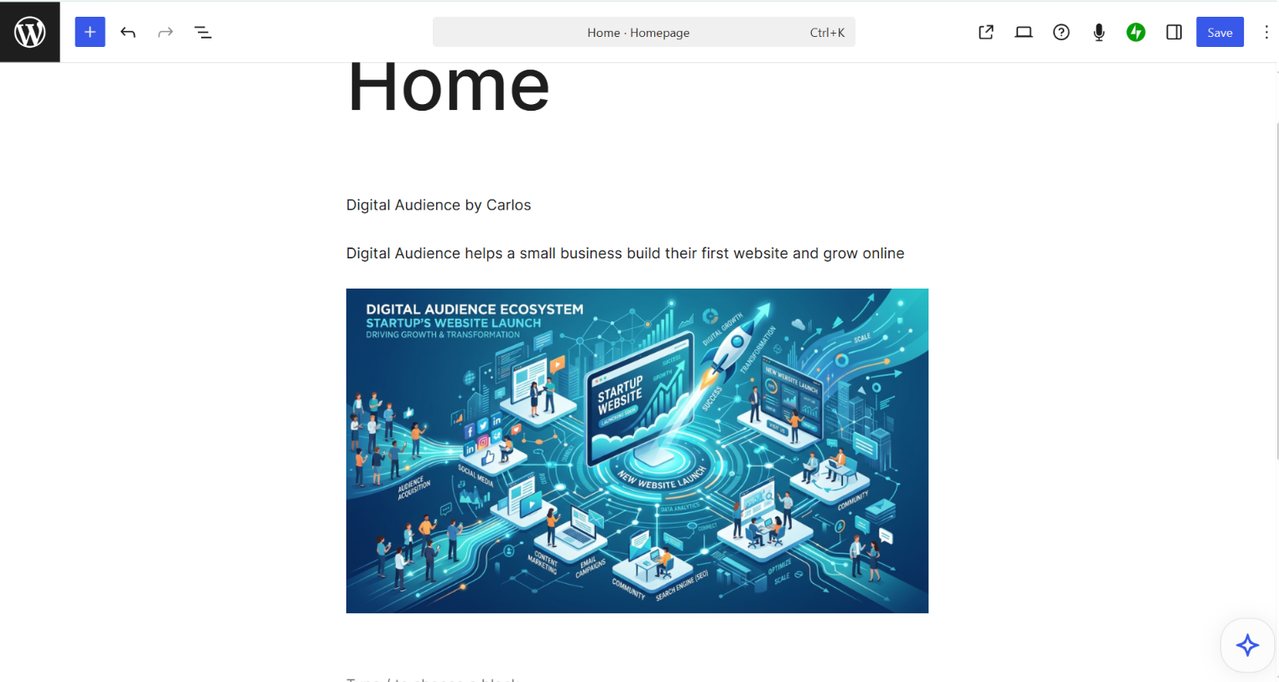
What did stand out: when I published my About page, WordPress.com immediately surfaced options to add a payment button or donation form directly into the page — no plugin required. On WordPress.org, accepting payments on a page almost always means installing and configuring a plugin (WooCommerce, a forms plugin with payment integration, etc.). Here it’s built into the publishing flow itself.
Themes: Curated vs. Unlimited
WordPress.org’s biggest advantage has always been theme selection — tens of thousands of free and premium themes, plus full control over modifying or building your own from scratch.
WordPress.com’s theme browser is more curated. Themes are organized by category — Blog, Portfolio, Business, Store, Art & Design, About, Real Estate, and more — which actually makes browsing faster if you know what kind of site you’re building. I found this more approachable than scrolling an unfiltered theme repository, but it’s a smaller pool, and some of the more polished options are gated behind specific plans rather than available to everyone.
Plans and Pricing
This is where the two platforms diverge most. WordPress.org itself is free — but you pay for hosting, a domain, and usually a handful of premium plugins or a theme, and those costs vary a lot depending on what you choose.
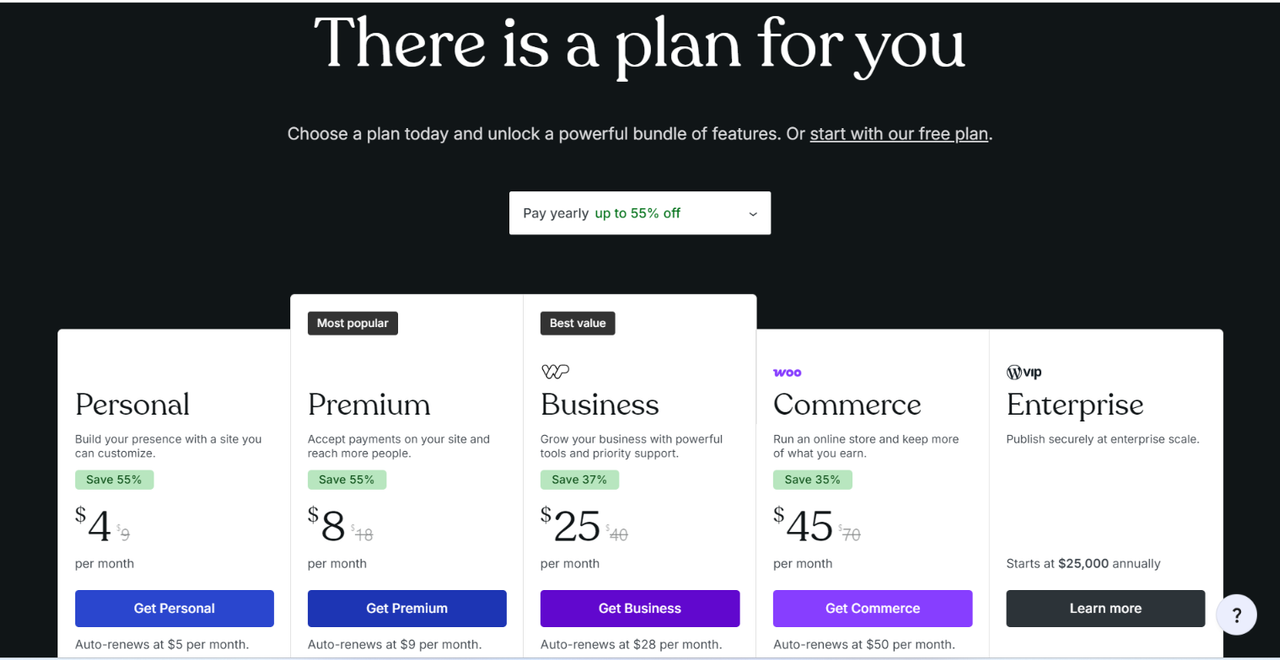
WordPress.com bundles everything into flat plans:
- Personal — $9/month, or $4/month billed annually
- Premium — $18/month, or $8/month billed annually
- Business — $25/month, billed annually
- Commerce — $45/month, billed annually
Each tier up unlocks more — custom domains, payment tools, deeper customization, plugin access, and ecommerce features at the top tier. For someone who doesn’t want to think about hosting, security patches, or plugin compatibility, that flat pricing is easy to budget around. For someone who already knows how to manage a self-hosted site cheaply, WordPress.org can come out cheaper — but you’re doing more of the work yourself.
What I’d Flag as a Real Limitation
I’ll be honest about the part that would bother me most if I were running a serious business on WordPress.com long-term: the lower plans restrict plugin installation and deeper customization. On WordPress.org, if I want a specific plugin or to hand-edit CSS, I just do it. On WordPress.com, that kind of control is locked behind the Business plan and above. If you’re the type of site owner who likes to tinker, or you have a very specific functionality requirement, you’ll hit that wall faster than you’d expect — and the jump from Personal to Business is a meaningful price increase, not a small upsell.
The flip side is that WordPress.com handles hosting, software updates, and security for you automatically — something I have to manage myself on WordPress.org. That’s a real trade: less control, less maintenance.
So Which One Should You Use?
If you want full control, don’t mind handling your own hosting and updates, and plan to use specific plugins or custom code, WordPress.org is still the better fit — it’s what I use for this site, and I don’t plan to switch.
If you want to go from zero to a published site in an afternoon, don’t want to think about hosting or security, and are fine working within a curated set of themes and features, WordPress.com is a genuinely easier starting point — especially for a first blog, a portfolio, or a small business site where speed matters more than deep customization.
If you want to try it yourself, WordPress.com offers a free plan to start, and you can see the full plan breakdown on their pricing page.
About the author: Carlos is a digital marketer and the publisher of Digital Audience, where he writes about websites, content tools, and online business platforms. He has years of hands-on experience running a self-hosted WordPress.org site and regularly tests hosting and website-builder platforms for comparison content.